Do Apple Watches Have Golf GPS? What You Get
Yes, Apple Watches can provide golf GPS through compatible golf apps. The app and watch model affect which distances and course features you get, and some features may need your iPhone or a paid plan.
On this page (8 sections)
- Do Apple Watches have golf GPS built in?
- What golf distances can an Apple Watch show?
- Can an Apple Watch replace a dedicated golf GPS watch?
- Does Apple Watch golf GPS work without an iPhone?
- Do Apple Watch golf apps need a subscription?
- Which dedicated golf GPS watches are worth comparing?
- How should you choose between an Apple Watch app and a golf watch?
- What should you check before your next round?
Yes, Apple Watches can provide golf GPS through compatible golf apps. The app uses course data and location to show yardages, but available distances, maps, and phone requirements depend on the app and your watch.
If you already wear an Apple Watch, an app may be enough for basic course distances. If you want a golf-first watch with preloaded courses and dedicated yardage screens, compare it with golf GPS watches before choosing.
Do Apple Watches have golf GPS built in?
Apple Watch GPS can locate your position, while a golf app supplies golf course information and yardages. A GPS-equipped watch can estimate your location on the course, and the app uses course data to present distances to features such as the green.
That means “golf GPS” is a combination of location hardware, app features, and course coverage. A watch with GPS alone does not guarantee that it includes golf course maps or golf-specific distances.
Check your watch model and the app’s requirements. Some apps offer a watch interface, while others focus on the iPhone or require the phone nearby for certain features.
What golf distances can an Apple Watch show?
The app determines which golf distances appear on your wrist. Front, middle, and back of green yardages are common features in golf GPS apps, but hazard distances, scoring, and hole maps vary.
A simple distance screen can help you choose a club when you have a clear view of the green. If you need to account for a bunker, water, or a layup point, check whether the app shows those features on the watch itself.
For a broader look at the available device types, see golf range finders explained: laser, GPS and hybrid. GPS gives course-position estimates, while a laser rangefinder measures distance to a target you point it at.
Can an Apple Watch replace a dedicated golf GPS watch?
It can work for golfers who already own a compatible Apple Watch and want app-based yardages. A dedicated golf GPS watch may be simpler if you prefer golf controls, course data, and distances without relying on a general-purpose smartwatch app.
Compare how each option handles course downloads, phone connection, screen readability, battery use, scoring, and subscription features. If you want a wrist device designed around golf distances, our guide to the best golf rangefinder watches for your wrist covers dedicated options.
A dedicated watch is not automatically the better fit. If you mainly want basic green distances and already use an app you like, your Apple Watch may cover that need.
Does Apple Watch golf GPS work without an iPhone?
It depends on the app, watch model, and which features you plan to use. Some watch and app combinations may handle location and basic distances on the wrist, while setup, updates, course downloads, or other functions may call for your iPhone.
Before playing, check the app’s offline guidance and load or select your course as directed. Confirm that the watch shows the expected yardages before you leave your phone in the cart or bag.
A golf-only watch can be a better match if you want to leave your phone behind. For a non-watch option, compare handheld golf GPS units for the course.
Do Apple Watch golf apps need a subscription?
Some golf apps charge for added features, so check the current plan before you depend on one. The free version may have different course maps, statistics, or watch functions than a paid plan.
Look for the details that affect your round: whether your course is covered, whether the watch display is included, whether offline use works, and whether a subscription opens the maps you want. App plans and features can change, so verify them in the app before choosing.
If recurring costs are a concern, see what you really get with golf GPS without a subscription. Dedicated GPS watches also differ in which course features require membership.
Which dedicated golf GPS watches are worth comparing?
A dedicated golf watch makes sense if you want course distances on your wrist without building your setup around an Apple Watch app. These examples offer different approaches, from a smartwatch with golf features to simpler distance-focused designs.
The S44 also pairs with an iPhone or Android phone for notifications and score uploads to the Garmin Golf app. Garmin says a Golf membership adds enhanced CourseView maps, green contour data, PlaysLike Distance, and Touch Targeting.
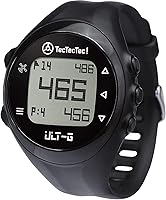
The ULT-G uses buttons instead of a touchscreen, with automatic hole progression and course selection from the watch. It also includes free course updates and does not require a subscription, according to TecTecTec.
NAVO says the W1 works independently on the course after the course is loaded. Its app supports course updates and scorecard syncing, so check that setup before you play.
How should you choose between an Apple Watch app and a golf watch?
Choose based on the course information and phone setup you want during a round. An Apple Watch app can suit you if your current watch and app cover your courses and show the yardages you need.
Choose a dedicated golf GPS watch if you want preloaded course coverage, golf-focused distance screens, or a device that can work without carrying your phone. Compare each model’s course count, battery information, display controls, and any paid features.
For Garmin-specific options across watches, handhelds, and lasers, see the best Garmin golf GPS devices. If you already use Garmin Golf, how Garmin Golf works on an Approach watch explains the app-and-watch relationship.
What should you check before your next round?
Confirm course coverage, phone needs, and the exact yardages shown by your app or watch. Open the course before tee time, check that location access is enabled, and make sure the watch has enough charge for the round.
If an Apple Watch app gives you the distances and course details you use, there may be no need to add another device. If you want preloaded courses and golf-first controls, compare a dedicated GPS watch such as the Garmin Approach S44, TecTecTec ULT-G, or NAVO W1.
Frequently asked questions
Do Apple Watches have built-in golf GPS?
Apple Watch has GPS on GPS-equipped models, but golf yardages usually come from a compatible golf app and its course data. Check the app's supported watch models and features before a round, since course maps, scoring, and phone requirements vary by app.
Can I use an Apple Watch for golf without my iPhone?
Sometimes. A compatible app and GPS-equipped watch may provide some golf features without your iPhone, but setup, course downloads, updates, or specific app features may still need the phone.
Check the app's offline instructions and test its setup before heading to the course.
Does Apple Watch show distance to the front, middle, and back of the green?
Many golf apps provide front, middle, and back yardages, but the exact screen and available distances depend on the app and course data. Check the app description for green-distance features, then confirm that your course is supported.
Is an Apple Watch golf app free?
Some golf apps have free features, while others charge for advanced maps or statistics. Review the app's current plan details and whether the features you want require a subscription before relying on it during a round.